Protecting the main Branch
GitHub shows “Your main branch isn’t protected” until you add rules to main. Rules stop
anyone, including the bot or you by accident, from deleting main or force pushing
(rewriting its history). You can also require changes to go through a pull request first.
This matters here because main is what goes live: every change to www/ on main deploys to
your real itch.io game (Guide 4).
How to read the screenshots
- 🟧 Orange: click or type here. The number matches the step in this guide.
- 🟨 Yellow: optional. See the notes.
- 🟩 Green: already set correctly. Just check it and leave it as is.
Before you start
- You need to be the repo’s owner or admin.
- Private repos on GitHub Free: you can create rules, but GitHub only enforces them on public repos, or on private repos with GitHub Pro, Team, or Enterprise. If this repo is becoming public, set the rules up now and they’ll start working when it goes public.
Pick your setup first
The rule that changes how you work is Require a pull request before merging:
| Setup | Rules | How games get to itch.io | Good for |
|---|---|---|---|
| A. Basic (recommended to start) | Restrict deletions + Block force pushes | The bot can still push to main, so “export and deploy” goes live right away. Pull requests work too. |
Solo projects, quick updates |
| B. Review first | A + Require a pull request before merging | Every change must be a pull request. The bot uses export-to-www.sh --pr, you play the preview, then merge to go live. |
Public repos, teams, anything you want to check before it goes live |
With B, a direct push to
mainis rejected, including the bot’s “export and deploy”, unless you add yourself to the bypass list (step 4). The bot pushes using your GitHub token, so if you’re on the bypass list, the bot can bypass too.
Fastest way: import a ready-made ruleset (JSON)
Instead of clicking through the steps below, you can import a file that has everything already set.
-
Download the file for your setup. Open it on GitHub, then click Download raw file (⤓):
Setup File A. Basic protect-main-basic.jsonB. Review first protect-main-review.jsonB + admin bypass (admins can still push straight to main)protect-main-review-admin-bypass.json - In the repo, go to Settings → Rules → Rulesets.
- Click the arrow on New ruleset → Import a ruleset, and choose the file.
- Check the settings it fills in, then click Create.
They all target the default branch (main) and are already set to Active.
Setup A: protect-main-basic.json
```json
{
"name": "Protect main",
"target": "branch",
"enforcement": "active",
"conditions": {
"ref_name": {
"include": [
"~DEFAULT_BRANCH"
],
"exclude": []
}
},
"rules": [
{
"type": "deletion"
},
{
"type": "non_fast_forward"
}
],
"bypass_actors": []
}
```
Setup B: protect-main-review.json
```json
{
"name": "Protect main (review first)",
"target": "branch",
"enforcement": "active",
"conditions": {
"ref_name": {
"include": [
"~DEFAULT_BRANCH"
],
"exclude": []
}
},
"rules": [
{
"type": "deletion"
},
{
"type": "non_fast_forward"
},
{
"type": "pull_request",
"parameters": {
"required_approving_review_count": 0,
"dismiss_stale_reviews_on_push": true,
"require_code_owner_review": false,
"require_last_push_approval": false,
"required_review_thread_resolution": false,
"allowed_merge_methods": [
"merge",
"squash",
"rebase"
]
}
}
],
"bypass_actors": []
}
```
`required_approving_review_count` is `0`, so you can merge your own pull requests when you work
alone. Raise it if collaborators should review first. The admin-bypass file is the same, plus
`"bypass_actors": [{"actor_id": 5, "actor_type": "RepositoryRole", "bypass_mode": "always"}]`
(5 = the Repository admin role).
Prefer to click through it yourself? Follow the steps below.
Steps
1. Open the rules page
On the repo’s main page, find the “Your main branch isn’t protected” banner and click Protect this branch.
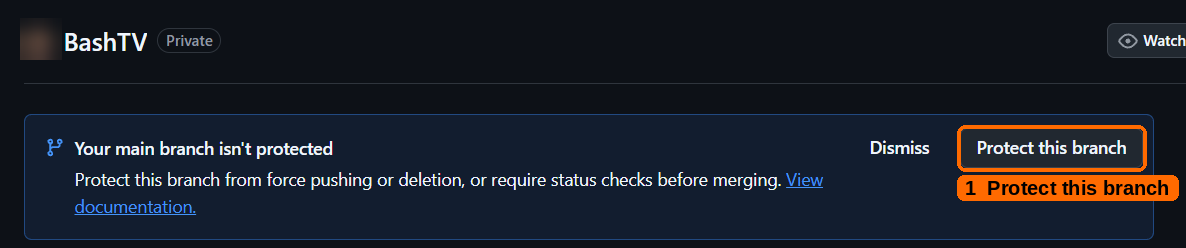
No banner? Go to Settings → Rules → Rulesets → New ruleset → New branch ruleset. (Older layout: Settings → Branches → Add branch ruleset.)
2–4. Name, turn it on, and choose the branch
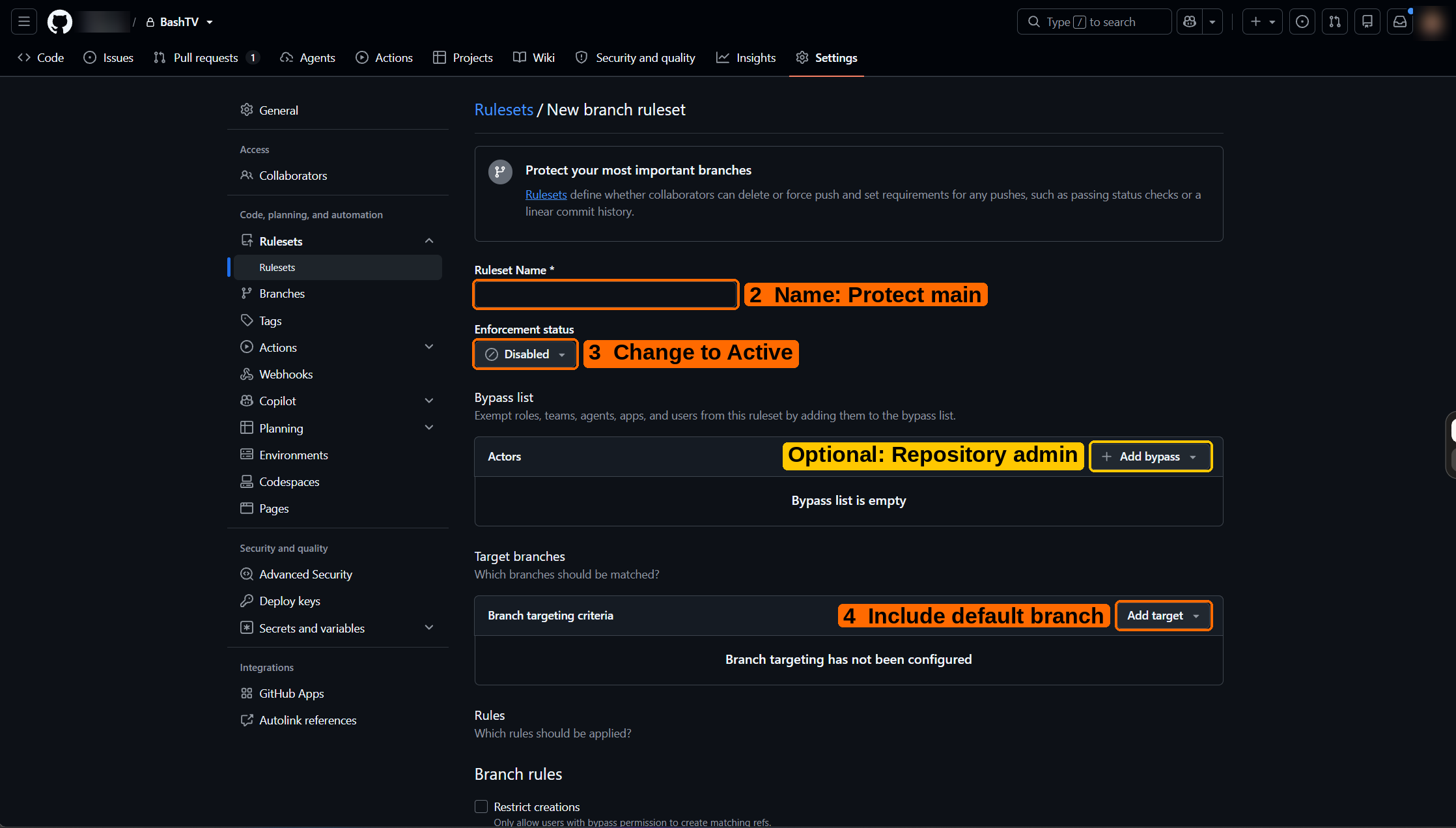
- Ruleset Name:
Protect main - Enforcement status: change Disabled to Active.
- Disabled saves the rules but doesn’t apply them, which is a common mistake.
- Evaluate shows what would be blocked without blocking it. It’s only on some plans.
- Target branches: click Add target → Include default branch. That’s
main.
Bypass list (optional): Add bypass → Repository admin lets admins skip the rules
when needed, set to Always or For pull requests only. Only add this if you chose setup B and
still want “export and deploy” to push straight to main. With setup A, leave it empty.
5–6. Choose the rules
Scroll down to Branch rules:
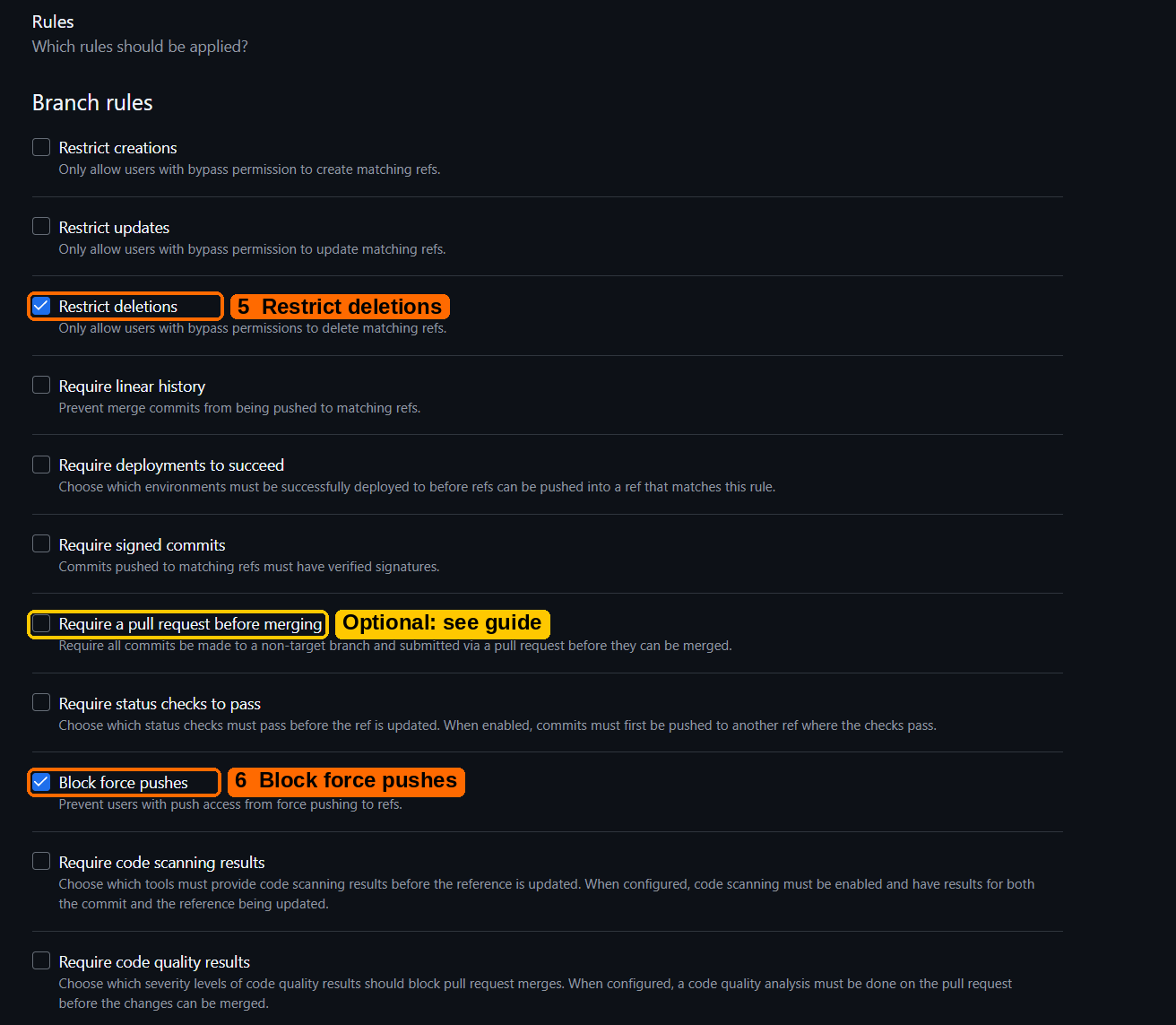
- ✅ Restrict deletions: nobody can delete
main. - ✅ Block force pushes: nobody can rewrite
main’s history.
Only for setup B: also check Require a pull request before merging. Then, under it:
| Option | Set to | Why |
|---|---|---|
| Required approvals | 0 if you work alone | GitHub doesn’t let you approve your own pull request. With 1 or more, you’d be stuck. |
| Dismiss stale approvals when new commits are pushed | On | Only matters if approvals > 0 |
| Require conversation resolution before merging | Optional | Comments must be marked resolved first |
| Allowed merge methods | Leave all on | Merge, squash, or rebase all deploy the same way |
Leave the rest unchecked. In particular:
| Rule | Leave it off because |
|---|---|
| Restrict creations / updates | Blocks the bot from creating export/… branches or updating main |
| Require linear history | Blocks normal Merge pull request merge commits |
| Require signed commits | The bot’s commits aren’t signed, so they’d be rejected |
| Require status checks to pass | Our deploy actions run after changes land, so there’s nothing to check first |
| Require deployments / code scanning / code quality / coverage | Not set up for this repo |
7. Create
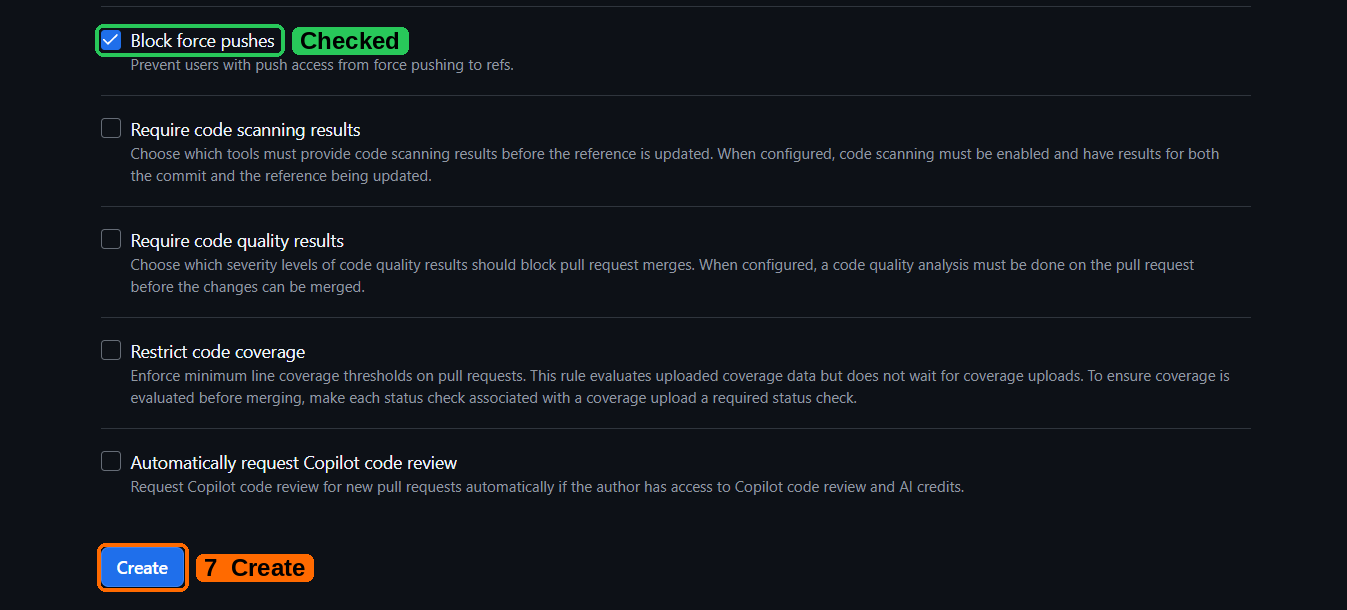
- Scroll to the bottom and click Create. The banner on the repo’s main page goes away.
Check it’s working
Ask the bot:
Check the branch protection on main.
The bot reads the rules from GitHub. No extra token permission is needed:
curl -s https://api.github.com/repos/OWNER/REPO/rules/branches/main
You should see "type": "deletion" and "type": "non_fast_forward" (force push), plus
"type": "pull_request" with setup B. An empty [] means the ruleset is still Disabled, or
it isn’t targeting main.
How this changes the bot’s workflow
| You ask the bot | Setup A | Setup B |
|---|---|---|
| “Export the game and deploy it” | ✅ Pushes to main → real game updates |
❌ Rejected. The bot switches to a pull request, unless you’re on the bypass list |
| “Export the game as a pull request” | ✅ Preview page updates. Merge to go live | ✅ Same, and it’s now the only way in |
| “Rewrite history / force push” | ❌ Blocked | ❌ Blocked |
| “Delete the main branch” | ❌ Blocked | ❌ Blocked |
Troubleshooting
| Problem | Fix |
|---|---|
Push rejected with GH013: Repository rule violations / “Changes must be made through a pull request” |
Setup B is working. Use a pull request (export-to-www.sh --pr), or add yourself to the bypass list. |
| “Cannot force-push to this branch” | Block force pushes is on. That’s intended. |
| The rules don’t seem to do anything | Check Enforcement status is Active, the target includes main, and the repo is public or on a paid plan. |
| Can’t merge my own pull request: “review required” | Set Required approvals to 0, or have a collaborator approve. |
| The Merge pull request button is greyed out by “linear history” | Turn off Require linear history, or use Squash and merge. |
| The bot’s commits are rejected as unsigned | Turn off Require signed commits. |
| Banner still shows | Refresh the page. If it’s still there, the ruleset is Disabled. |
Quick checklist
- Chose setup A (basic) or B (review first)
- Protect this branch → ruleset named
Protect main - Enforcement status: Active
- Target: Include default branch
- ✅ Restrict deletions
- ✅ Block force pushes
- Setup B only: ✅ Require a pull request (approvals 0 if solo)
- Create clicked, and the banner is gone
- Bot confirmed the rules on
main