Auto-Deploy to itch.io with GitHub Actions
This guide sets up a GitHub Action that uploads your game to itch.io every time you
change it. Put your game in the www/ folder, push to GitHub, and the action uses
butler to send it to itch.io automatically.
How to read the screenshots
- 🟧 Orange: click or type here. The number matches the step in this guide.
- 🟨 Yellow: optional, or your choice.
- 🟩 Green: already set correctly. Just check it and leave it as is.
How it works
You or the bot change files in www/
        ↓  push to GitHub (main branch)
GitHub Action starts
        ↓  installs butler, uploads www/
itch.io game page updates (html5 channel)
- Runs automatically whenever anything inside
www/changes onmain. - Can be run by hand from the repo’s Actions tab → Deploy to itch.io → Run workflow.
- Only uploads what changed, so later deploys are fast.
- The version on itch.io is the short commit ID, so you can tell which commit is live.
- Writes
www/build-info.json(version, build time,liveorpreview) so the game can show which build it is. The sample game inwww/shows it on screen.
What you need
- The GitHub setup (a repo and a Bash GitHub key)
- An itch.io API key and a game page (see itch.io + butler)
- Your game’s files with an
index.htmlat the top of thewww/folder
Part 1: Let the Bash token add Actions files
GitHub won’t let a token add or change files in .github/workflows/ unless it has the
Workflows permission. Without it, the push fails with “refusing to allow a Personal
Access Token to create or update workflow … without workflow scope”.
- Go to GitHub → Settings → Developer settings → Personal access tokens → Fine-grained tokens. Direct link: https://github.com/settings/personal-access-tokens
- Click your Bash token, then click Edit.
-
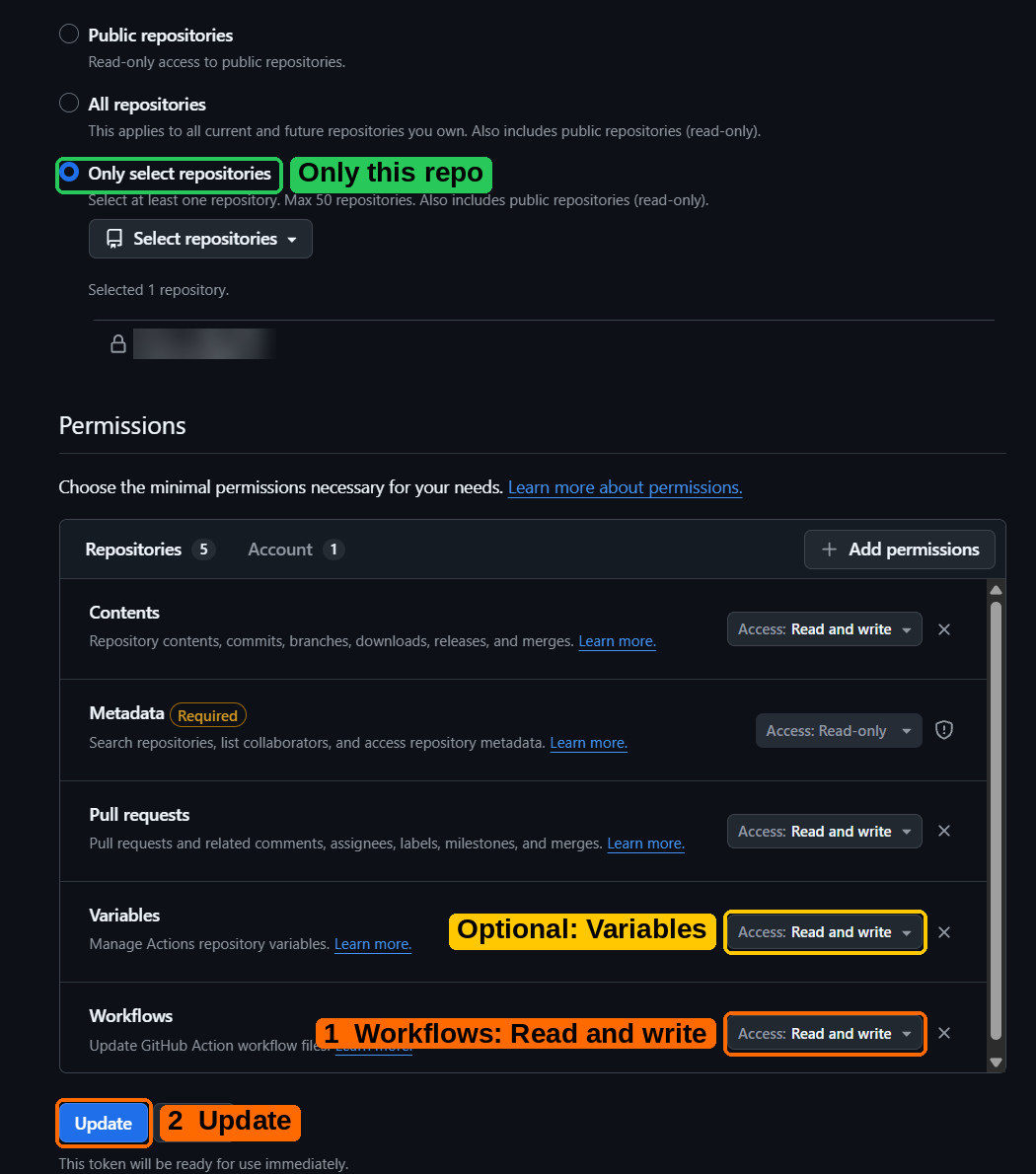
Under Permissions → Repositories, click + Add permissions and set:
Permission Setting Needed? Workflows Read and write Required. Lets the bot add the action file Variables Read and write Optional. Lets the bot fill in the game settings Actions Read-only Optional. Lets the bot read run results and logs -
Click Update.
Part 2: Add your itch.io key to GitHub
The action runs on GitHub’s computers, not in Bash, so GitHub needs its own copy of the itch.io key. Only you can do this. The bot never sees the key.
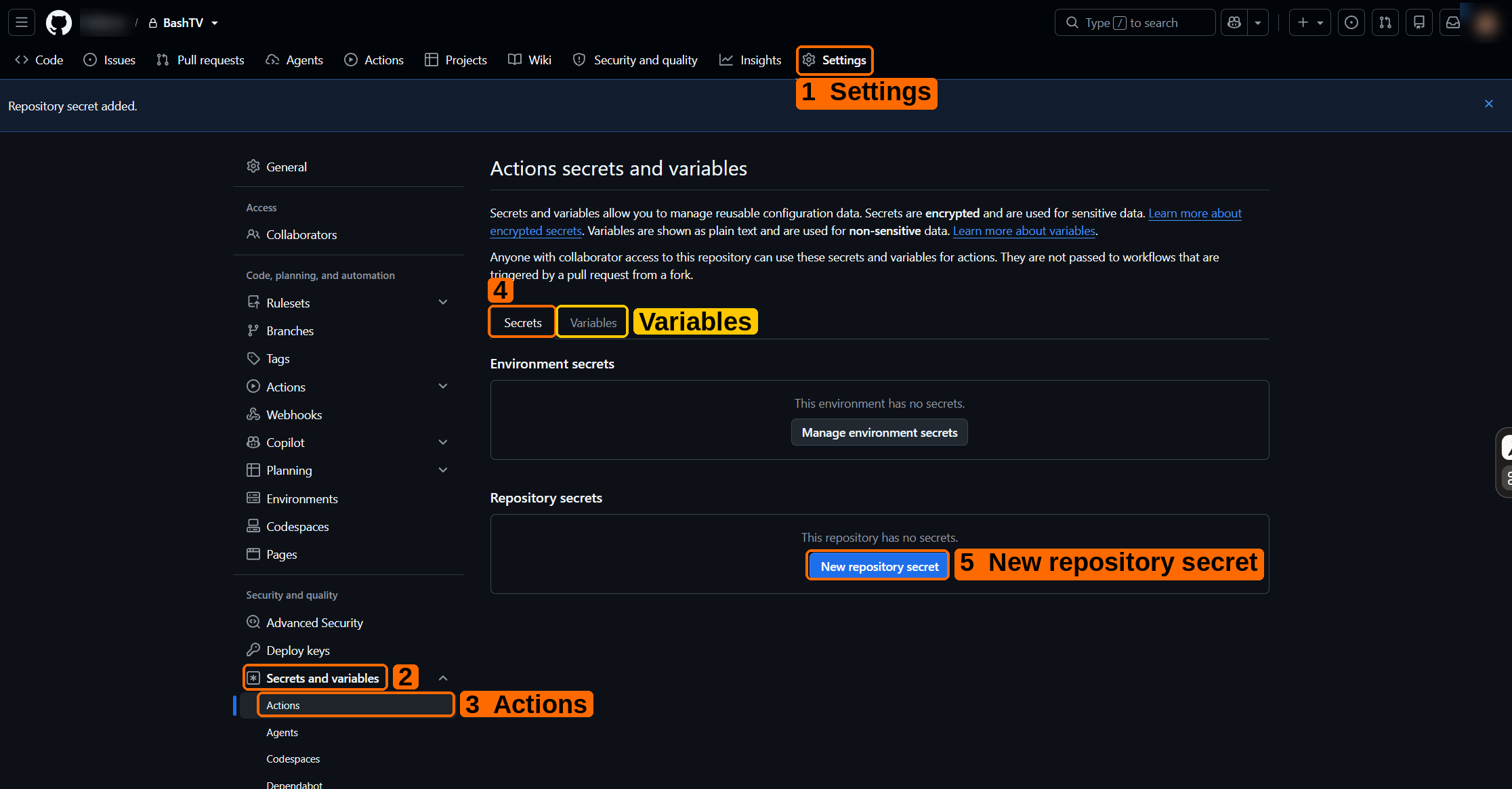
- Open your repo on GitHub and click Settings (top tab).
- In the left menu, click Secrets and variables.
- Click Actions.
- Stay on the Secrets tab.
-
Click New repository secret.
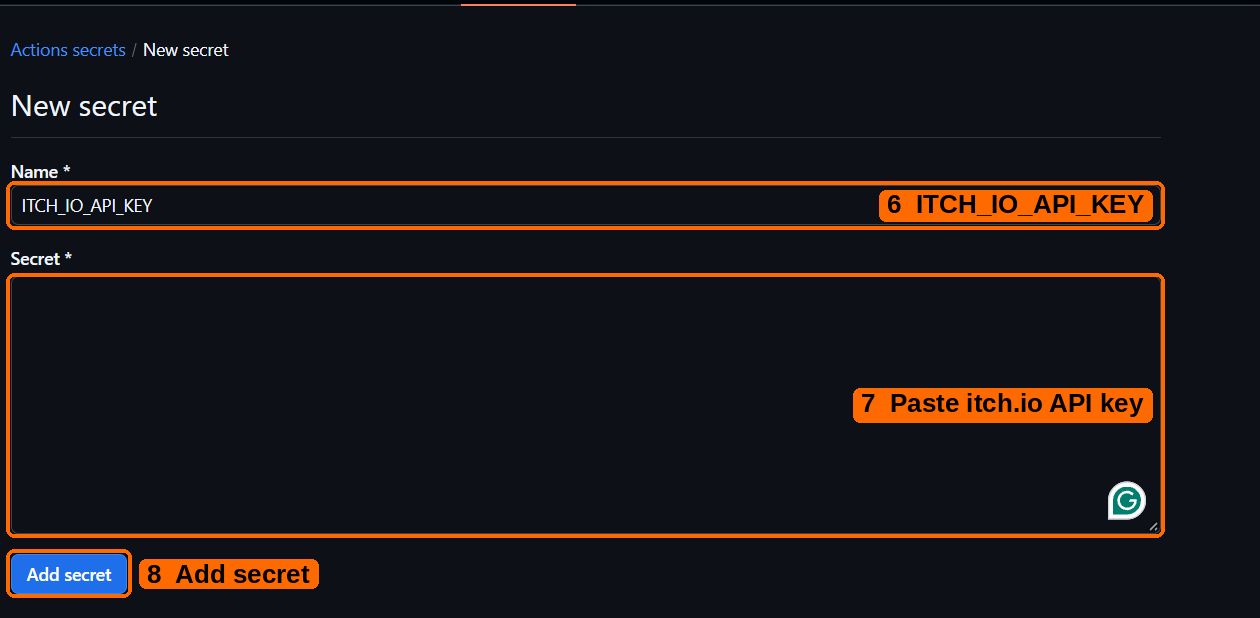
- Name:
ITCH_IO_API_KEY(exactly like this) - Secret: paste your itch.io API key (from https://itch.io/user/settings/api-keys)
-
Click Add secret.
GitHub hides secrets in the logs, and nobody can read them back, including you. To change the key later, click the secret and choose Update.
Part 3: Tell the action which game to update
On the same page, open the Variables tab (next to Secrets) and click New repository variable for each of these:
| Name | Value | Example |
|---|---|---|
ITCH_USER |
Your itch.io username | yourname |
ITCH_GAME |
The game’s page name from its URL | my-game |
ITCH_CHANNEL |
Optional. Leave it out to use html5 |
html5 |
For https://yourname.itch.io/my-game, ITCH_USER is yourname and ITCH_GAME is my-game.
These live in GitHub settings, not in the action file, so your username and game don’t show up in the code. If you gave the token Variables permission, just ask the bot to set them.
Part 4: Add the action file
Ask the bot:
Add the itch.io deploy action to the repo.
Or create it yourself at .github/workflows/deploy-itch.yml with this content:
# =============================================================================
# Deploy to itch.io
#
# Uploads everything in the www/ folder to itch.io using butler, itch.io's
# official upload tool: https://itch.io/docs/butler/
#
# One-time setup (repo Settings > Secrets and variables > Actions):
#
#   Secrets tab
#     ITCH_IO_API_KEY   Your itch.io API key
#                       (https://itch.io/user/settings/api-keys)
#
#   Variables tab
#     ITCH_USER         Your itch.io username   (yourname.itch.io  -> yourname)
#     ITCH_GAME         The game's page name    (.../my-game       -> my-game)
#     ITCH_CHANNEL      Optional. Defaults to "html5" (for browser games).
#
# The username and game live in Variables, not in this file, so they don't
# appear in the code.
#
# After the FIRST deploy, on itch.io open Edit game and set:
#   Kind of project -> HTML
#   Uploads -> check "This file will be played in the browser"
# The itch.io API can't change those. Later deploys update the page automatically.
# =============================================================================

name: Deploy to itch.io

on:
  # Deploy whenever anything inside www/ changes on the main branch.
  push:
    branches: [main]
    paths: ["www/**"]

  # Also adds a "Run workflow" button under the Actions tab, so you can
  # deploy by hand at any time.
  workflow_dispatch:

# Only one deploy runs at a time. If you push again while a deploy is still
# running, the older one is cancelled and the newest version wins.
concurrency:
  group: itch-deploy
  cancel-in-progress: true

jobs:
  deploy:
    runs-on: ubuntu-latest

    # Only needs to read the repo's files.
    permissions:
      contents: read

    env:
      # butler reads its key from BUTLER_API_KEY. It's filled from the
      # ITCH_IO_API_KEY secret, and GitHub hides it in the logs.
      BUTLER_API_KEY: $
      # Where to upload, e.g. "yourname/my-game".
      ITCH_TARGET: $/$
      # Which itch.io channel to upload to. "html5" = playable in the browser.
      ITCH_CHANNEL: $
      # Optional: post each new build to a Discord channel (docs/services/discord-webhook.md).
      DISCORD_WEBHOOK_URL: $

    steps:
      # 1. Download this repo's files onto the GitHub runner.
      - name: Get the repo files
        uses: actions/checkout@v4

      # 2. Stop early with a clear message if any setting is missing.
      - name: Check settings
        run: |
          missing=0
          [ -n "$BUTLER_API_KEY" ] || { echo "::error::Missing secret ITCH_IO_API_KEY (Settings > Secrets and variables > Actions > Secrets)."; missing=1; }
          [ -n "$" ] || { echo "::error::Missing variable ITCH_USER (Settings > Secrets and variables > Actions > Variables)."; missing=1; }
          [ -n "$" ] || { echo "::error::Missing variable ITCH_GAME (Settings > Secrets and variables > Actions > Variables)."; missing=1; }
          [ -f www/index.html ] || { echo "::error::www/index.html is missing. Browser games need an index.html at the top of www/."; missing=1; }
          exit $missing

      # 3. Download the latest butler straight from itch.io.
      - name: Install butler
        run: |
          curl -sSL -o butler.zip https://broth.itch.zone/butler/linux-amd64/LATEST/archive/default
          unzip -q butler.zip -d "$HOME/butler"
          chmod +x "$HOME/butler/butler"
          echo "$HOME/butler" >> "$GITHUB_PATH"

      # 4. Write build-info.json so the game can show which build is live.
      #    (Games that don't read it just ignore the file.)
      - name: Write build info
        run: |
          printf '{ "version": "%s", "built": "%s", "channel": "live" }\n' \
            "${GITHUB_SHA::7}" "$(date -u +%Y-%m-%dT%H:%M:%SZ)" > www/build-info.json
          cat www/build-info.json

      # 5. Upload www/ to itch.io. butler only sends what changed since the
      #    last upload. The version shown on itch.io is the short commit ID.
      - name: Push to itch.io
        run: |
          butler -V
          butler push www "$ITCH_TARGET:$ITCH_CHANNEL" --userversion "${GITHUB_SHA::7}"

      # 6. Print the upload status in the log so you can check it finished.
      - name: Show status
        run: butler status "$ITCH_TARGET:$ITCH_CHANNEL"

      # 7. Optional: announce the build in Discord. Skipped unless the
      #    DISCORD_WEBHOOK_URL secret is set. Mentions are disabled.
      - name: Post to Discord
        if: env.DISCORD_WEBHOOK_URL != ''
        run: |
          URL="https://$.itch.io/$"
          MSG="🎮 **New build live on itch.io**: \`${GITHUB_SHA::7}\` · $URL"
          jq -n --arg c "$MSG" '{content: $c, allowed_mentions: {parse: []}}' |
            curl -sS --fail-with-body -H "Content-Type: application/json" -d @- "$DISCORD_WEBHOOK_URL"
Part 5: Deploy
Put your game in www/ (with index.html at the top) and push to main. The action starts
by itself. Or go to the Actions tab → Deploy to itch.io → Run workflow.
To watch it, open the Actions tab and click the newest run. A green ✓ means it uploaded. The Show status step lists the build that itch.io received.
First deploy only: on itch.io, open Edit game and set:
- Kind of project → HTML
- Uploads → check This file will be played in the browser on the
html5file - Save
The itch.io API can’t change these. After this, every deploy updates the page automatically.
The full flow: make it in Bash, deploy automatically
Make the game in Bash
        ↓  bot runs scripts/export-to-www.sh
Game copied into www/ and committed
        ↓
   ┌────────────── direct ──────────────┐   ┌──────────── pull request ────────────┐
   push to main                             new branch + pull request
   deploy-itch.yml runs                     deploy-itch-preview.yml runs
   real itch.io game updates                PREVIEW itch.io page updates
                                            + preview link posted on the PR
                                                    ↓ merge the PR
                                            deploy-itch.yml → real game updates
   └────────────────────────────────────┘   └──────────────────────────────────────┘
Ask the bot:
- Straight to itch.io: “Export the game to www and deploy it.”
The bot runs
scripts/export-to-www.sh <game-folder>. - Review first: “Export the game to www as a pull request.”
The bot runs
scripts/export-to-www.sh <game-folder> --pr, then sends you the pull request link. Play the preview, then click Merge pull request on GitHub to make it live.
What the export script does
- Copies the finished game into
www/, replacing what was there. It leaves out.git,node_modules,.envfiles,.mapfiles and logs. - Checks that
index.htmlis at the top, that the game fits itch.io’s limits (1,000 files, 500 MB), and warns about/absolutepaths that break on itch.io. - Stops if nothing changed.
- Commits and pushes to
main, or with--pr, to a newexport/…branch and opens a pull request.
--dry-run shows what would change without committing.
Pull request previews
The second action, .github/workflows/deploy-itch-preview.yml, runs when a pull request
changes www/. It uploads that version to a separate preview page on itch.io, so the real
game is only updated when you merge.
One-time setup
- On itch.io, create a second game page for previews, for example my-game-preview (https://itch.io/game/new). Leave it as Draft so only you can see it.
-
In the repo: Settings → Secrets and variables → Actions → Variables → New repository variable
Name Value Example ITCH_PREVIEW_GAMEThe preview page’s name my-game-previewIt reuses the
ITCH_IO_API_KEYsecret and theITCH_USERvariable. - After the first preview upload, set the preview page to Kind of project → HTML and check This file will be played in the browser, same as the real game.
If ITCH_PREVIEW_GAME isn’t set, the preview action skips instead of touching the real game.
What you’ll see
- A comment on the pull request: “🎮 itch.io preview is up: …” with the link. It’s updated on each new commit.
- On itch.io, the preview version is shown as
pr<number>-<commit>. - Pull requests from forks are skipped, because GitHub doesn’t share secrets with them.
The preview action file
Save it as .github/workflows/deploy-itch-preview.yml:
# =============================================================================
# Preview deploy to itch.io (pull requests)
#
# When a pull request changes anything in www/, this uploads that version to a
# separate PREVIEW game page on itch.io, so you can play it before merging.
# The real game is only updated after the pull request is merged into main
# (by deploy-itch.yml).
#
# One-time setup:
#   1. On itch.io, create a second game page for previews, e.g. "my-game-preview".
#      Keep it as a Draft (only you can see it) or Restricted.
#      After the first preview upload, set: Edit game > Kind of project > HTML,
#      and check "This file will be played in the browser" on the html5 file.
#   2. Repo Settings > Secrets and variables > Actions > Variables:
#        ITCH_PREVIEW_GAME   The preview page name   (.../my-game-preview -> my-game-preview)
#      It uses the same ITCH_IO_API_KEY secret and ITCH_USER variable as
#      deploy-itch.yml.
#
# If ITCH_PREVIEW_GAME isn't set, this skips the upload instead of touching the
# real game.
# =============================================================================

name: Preview deploy to itch.io

on:
  # Runs when a pull request into main is opened, or gets new commits,
  # and it changes something inside www/.
  pull_request:
    branches: [main]
    paths: ["www/**"]

  # "Run workflow" button under the Actions tab.
  workflow_dispatch:

# One preview deploy per pull request at a time. A newer commit cancels an
# older run that's still going.
concurrency:
  group: itch-preview-$
  cancel-in-progress: true

jobs:
  preview:
    runs-on: ubuntu-latest

    # Pull requests from forks don't get the itch.io key (GitHub blocks
    # secrets there for safety), so only run for branches in this repo.
    if: github.event_name == 'workflow_dispatch' || github.event.pull_request.head.repo.full_name == github.repository

    permissions:
      contents: read        # read the repo files
      pull-requests: write  # post the preview link as a comment

    env:
      BUTLER_API_KEY: $
      ITCH_USER: $
      ITCH_PREVIEW_GAME: $
      ITCH_CHANNEL: $
      # Optional: announce previews in Discord (docs/services/discord-webhook.md).
      DISCORD_WEBHOOK_URL: $

    steps:
      # 1. Download the pull request's version of the files.
      - name: Get the repo files
        uses: actions/checkout@v4

      # 2. Check settings. Skip (don't fail) if no preview page is set up.
      - name: Check settings
        id: check
        run: |
          if [ -z "$ITCH_PREVIEW_GAME" ]; then
            echo "::notice::No ITCH_PREVIEW_GAME variable, so the preview upload was skipped. Add one to get itch.io previews for pull requests."
            echo "skip=true" >> "$GITHUB_OUTPUT"; exit 0
          fi
          missing=0
          [ -n "$BUTLER_API_KEY" ] || { echo "::error::Missing secret ITCH_IO_API_KEY."; missing=1; }
          [ -n "$ITCH_USER" ] || { echo "::error::Missing variable ITCH_USER."; missing=1; }
          [ -f www/index.html ] || { echo "::error::www/index.html is missing."; missing=1; }
          exit $missing

      # 3. Download the latest butler from itch.io.
      - name: Install butler
        if: steps.check.outputs.skip != 'true'
        run: |
          curl -sSL -o butler.zip https://broth.itch.zone/butler/linux-amd64/LATEST/archive/default
          unzip -q butler.zip -d "$HOME/butler"
          chmod +x "$HOME/butler/butler"
          echo "$HOME/butler" >> "$GITHUB_PATH"

      # 4. Write build-info.json so the game can show which build this is.
      - name: Write build info
        if: steps.check.outputs.skip != 'true'
        run: |
          SHA="$"
          VERSION="pr$-${SHA::7}"
          printf '{ "version": "%s", "built": "%s", "channel": "preview" }\n' \
            "$VERSION" "$(date -u +%Y-%m-%dT%H:%M:%SZ)" > www/build-info.json
          cat www/build-info.json

      # 5. Upload www/ to the PREVIEW page. The version is "pr<number>-<commit>".
      - name: Push preview to itch.io
        if: steps.check.outputs.skip != 'true'
        run: |
          SHA="$"
          VERSION="pr$-${SHA::7}"
          echo "VERSION=$VERSION" >> "$GITHUB_ENV"
          butler push www "$ITCH_USER/$ITCH_PREVIEW_GAME:$ITCH_CHANNEL" --userversion "$VERSION"
          butler status "$ITCH_USER/$ITCH_PREVIEW_GAME:$ITCH_CHANNEL"

      # 6. Post (or update) one comment on the pull request with the link.
      - name: Comment preview link
        if: steps.check.outputs.skip != 'true' && github.event_name == 'pull_request'
        uses: actions/github-script@v7
        with:
          script: |
            const url = `https://${process.env.ITCH_USER}.itch.io/${process.env.ITCH_PREVIEW_GAME}`;
            const body = `<!-- itch-preview -->\n🎮 **itch.io preview is up:** ${url}\n\nVersion \`${process.env.VERSION}\`. Merge this pull request to update the real game.`;
            const { owner, repo } = context.repo;
            const issue_number = context.issue.number;
            const comments = await github.paginate(github.rest.issues.listComments, { owner, repo, issue_number });
            const old = comments.find(c => c.body.includes('<!-- itch-preview -->'));
            if (old) await github.rest.issues.updateComment({ owner, repo, comment_id: old.id, body });
            else await github.rest.issues.createComment({ owner, repo, issue_number, body });

      # 7. Optional: announce the preview in Discord. Skipped unless a
      #    DISCORD_PREVIEW_WEBHOOK_URL or DISCORD_WEBHOOK_URL secret is set.
      - name: Post to Discord
        if: steps.check.outputs.skip != 'true' && env.DISCORD_WEBHOOK_URL != ''
        run: |
          URL="https://$ITCH_USER.itch.io/$ITCH_PREVIEW_GAME"
          PR="$"
          MSG="🧪 **Preview build on itch.io**: \`$VERSION\` · $URL${PR:+ · PR: $PR}"
          jq -n --arg c "$MSG" '{content: $c, allowed_mentions: {parse: []}}' |
            curl -sS --fail-with-body -H "Content-Type: application/json" -d @- "$DISCORD_WEBHOOK_URL"
Troubleshooting
| Problem | Fix |
|---|---|
| “refusing to allow a Personal Access Token to create or update workflow” | Add Workflows: Read and write to the token (Part 1). |
| “Missing secret ITCH_IO_API_KEY” | Add the secret with exactly that name (Part 2). |
| “Missing variable ITCH_USER” / “ITCH_GAME” | Add the variables on the Variables tab (Part 3). |
| “www/index.html is missing” | Browser games need index.html directly inside www/, not in a subfolder. |
| The action didn’t start | It only runs when files inside www/ change on main. Use Run workflow to start it by hand. |
| The page only shows Download | Do the First deploy only settings in Part 5. |
| The bot can’t see whether a run passed | Add Actions: Read-only to the token. |
| No preview comment on the pull request | Add the ITCH_PREVIEW_GAME variable. Without it, the preview action skips. |
| Want a Discord message for each build | Add the DISCORD_WEBHOOK_URL secret (Discord webhook). |
| A push goes live straight away | That’s expected for a Public game. Set it to Draft on itch.io while testing. |
Quick checklist
- Token has Workflows: Read and write
- Secret
ITCH_IO_API_KEYadded - Variables
ITCH_USERandITCH_GAMEadded .github/workflows/deploy-itch.ymlin the repo- Game files in
www/withindex.html - Pushed to
main, with a green ✓ in Actions - itch.io: Kind of project → HTML and played in the browser (first time only)
- Optional: preview page +
ITCH_PREVIEW_GAMEvariable for pull request previews