Letting the Bash Bot Create GitHub Gists
Follow the GitHub setup guide first: https://gist.github.com/83b60ed525138e117ffb02d6323b2918 This guide adds the extra settings the bot needs to create and update gists (https://gist.github.com).
How to read the screenshots
- 🟧 Orange: click or type here. The number matches the step in this guide.
- 🟨 Yellow: optional.
- 🟩 Green: already set correctly. Just check it and leave it as is.
Part 1: Add the Gists permission to your GitHub token
Without this permission, GitHub blocks the bot and shows the error “Resource not accessible by personal access token.”
- Go to GitHub → Settings → Developer settings → Personal access tokens → Fine-grained tokens. Direct link: https://github.com/settings/personal-access-tokens
- Click your Bash token, then click Edit.
- Under Permissions, click + Add permissions and choose Account.
- Find Gists and set it to Read and write.
- Click Update.
The token itself stays the same, so you don’t need to change anything in Bash for this part.
| Permission (Account) | Setting |
|---|---|
| Gists | Read and write |
Part 2: Add gist.github.com to the Bash key
Bash only sends your key to the addresses listed on it. Gists use their own address, so add it to the list.
- Open your space’s Settings → API keys, click the GitHub key, and open More options.
-
Follow the numbers in the screenshot:
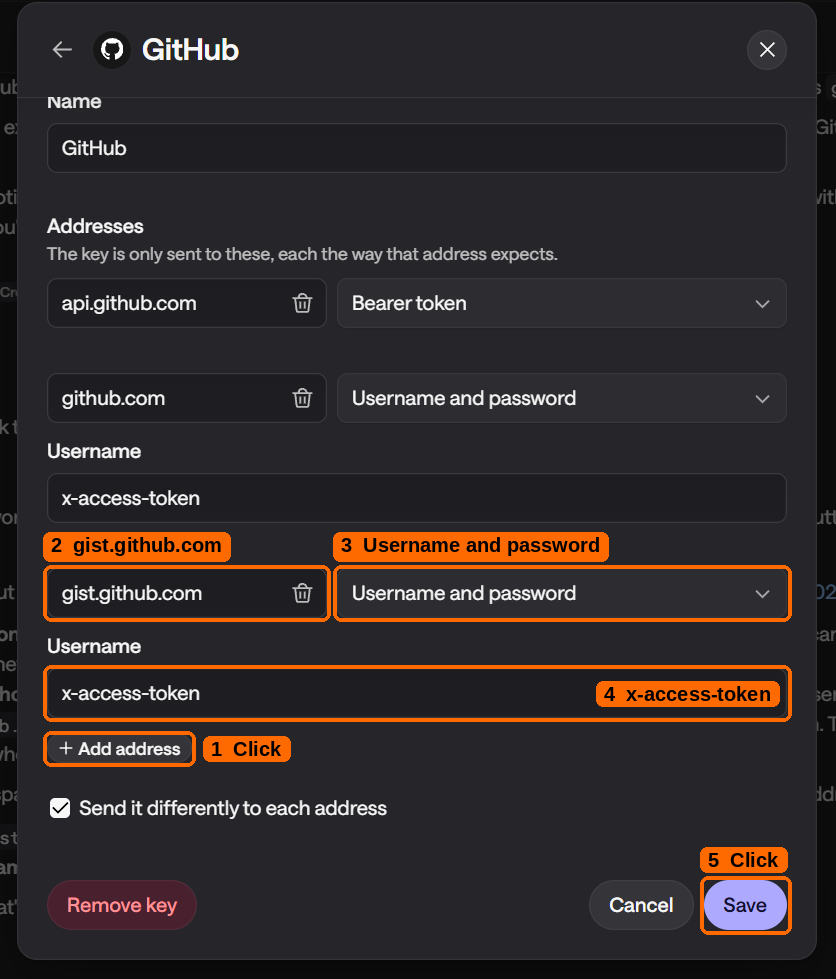
- Click + Add address.
- Type
gist.github.com. - Choose Username and password.
- Username:
x-access-token - Click Save. Don’t skip this step, or the change is lost.
When you’re done, the key should list three addresses:
| Address | Type | Username |
|---|---|---|
api.github.com |
Bearer token | – |
github.com |
Username and password | x-access-token |
gist.github.com |
Username and password | x-access-token |
Part 3: Ask the bot to check it
Gists are set up. Please check that you can create one.
What works, and one limit
| What | Works? |
|---|---|
| Create a gist (public or secret) | ✅ |
| Edit a gist’s text files | ✅ |
| Download (clone) a gist | ✅ |
| Upload images to a gist | ❌ GitHub doesn’t allow fine-grained tokens to do this |
Workaround for images: the bot uploads screenshots to a free image host (we use freeimage.host) and links them in the gist. Copies are also kept in the guide’s GitHub repo.
Anything uploaded to an image host is public. Blur names, profile pictures, emails, and tokens first.
Troubleshooting
| Problem | Fix |
|---|---|
| “Resource not accessible by personal access token” | Gists isn’t set to Read and write yet (Part 1). |
| “could not read Username for ‘https://gist.github.com’” | gist.github.com isn’t on the Bash key, or you didn’t click Save (Part 2). |
| “Repository not found” when uploading images to a gist | This is the GitHub limit above. Use the image host workaround. |
| Images in a gist are broken | The images link to a private repo. Use image host links instead. |
Quick checklist
- Token: Account → Gists → Read and write
- Token updated on GitHub
- Bash key has
gist.github.com→ Username and password →x-access-token - Save clicked
- Bot confirmed it can create a gist