Letting the Bash Bot Create GitHub Gists
Do the GitHub setup first. This guide adds the extra settings the bot needs to create and update gists (https://gist.github.com).
How to read the screenshots
- 🟧 Orange: click or type here. The number matches the step in this guide.
- 🟨 Yellow: optional.
- 🟩 Green: already set correctly. Just check it and leave it as is.
Part 1: Add the Gists permission to your GitHub token
Without this permission, GitHub blocks the bot and shows the error “Resource not accessible by personal access token.”
- Go to GitHub → Settings → Developer settings → Personal access tokens → Fine-grained tokens. Direct link: https://github.com/settings/personal-access-tokens
- Click your Bash token, then click Edit.
- Under Permissions, click + Add permissions and choose Account.
- Find Gists and set it to Read and write.
- Click Update.
The token itself stays the same, so you don’t need to change anything in Bash for this part.
| Permission (Account) | Setting |
|---|---|
| Gists | Read and write |
Part 2: Add gist.github.com to the Bash key
Bash only sends your key to the addresses listed on it. Gists use their own address, so add it to the list.
- Open your space’s Settings → API keys, click the GitHub key, and open More options.
-
Follow the numbers in the screenshot:
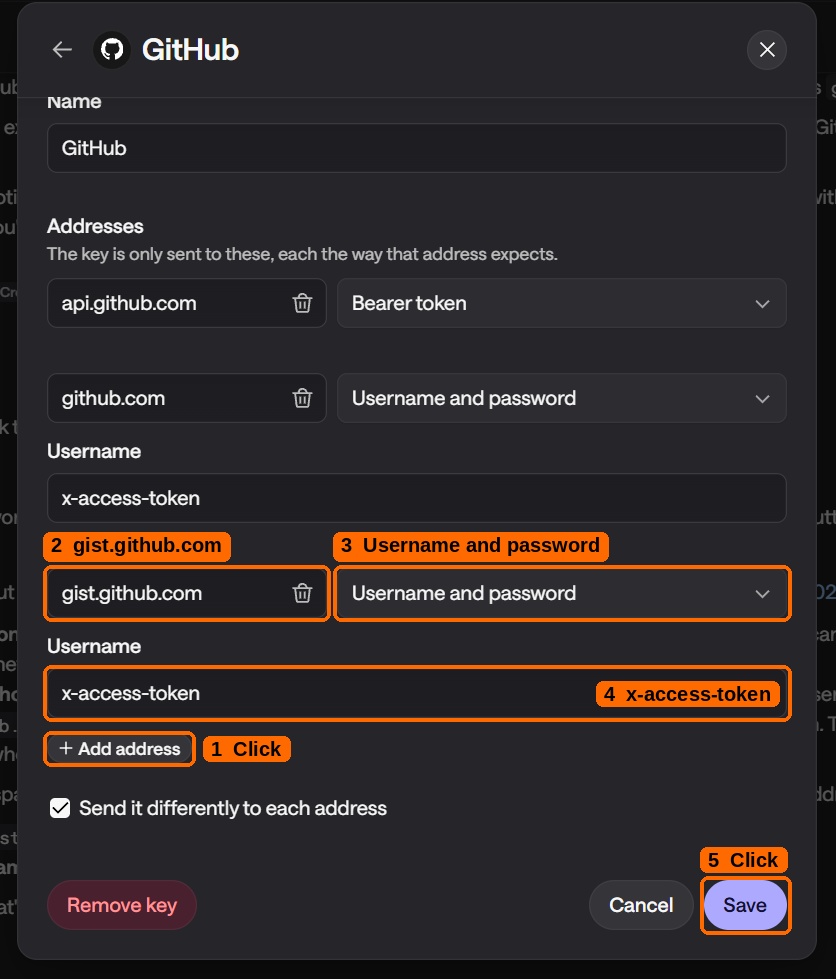
- Click + Add address.
- Type
gist.github.com. - Choose Username and password.
- Username:
x-access-token - Click Save. Don’t skip this step, or the change is lost.
When you’re done, the key should list three addresses:
| Address | Type | Username |
|---|---|---|
api.github.com |
Bearer token | – |
github.com |
Username and password | x-access-token |
gist.github.com |
Username and password | x-access-token |
Part 3: Ask the bot to check it
Gists are set up. Please check that you can create one.
What works, and one limit
| What | Works? |
|---|---|
| Create a gist (public or secret) | ✅ |
| Edit a gist’s text files | ✅ |
| Download (clone) a gist | ✅ |
| Upload images to a gist | ❌ GitHub doesn’t allow fine-grained tokens to do this |
Workaround for images: the bot uploads screenshots to a free image host (we use freeimage.host) and links them in the gist. It also keeps a copy in this repo under docs/images/.
Anything uploaded to an image host is public. Blur names, profile pictures, emails, and tokens first.
Troubleshooting
| Problem | Fix |
|---|---|
| “Resource not accessible by personal access token” | Gists isn’t set to Read and write yet (Part 1). |
| “could not read Username for ‘https://gist.github.com’” | gist.github.com isn’t on the Bash key, or you didn’t click Save (Part 2). |
| “Repository not found” when uploading images to a gist | This is the GitHub limit above. Use the image host workaround. |
| Images in a gist are broken | The images link to a private repo. Use image host links instead. |
Quick checklist
- Token: Account → Gists → Read and write
- Token updated on GitHub
- Bash key has
gist.github.com→ Username and password →x-access-token - Save clicked
- Bot confirmed it can create a gist
← Previous · Home · Next: Push games to itch.io with butler →